
Configure your branded site
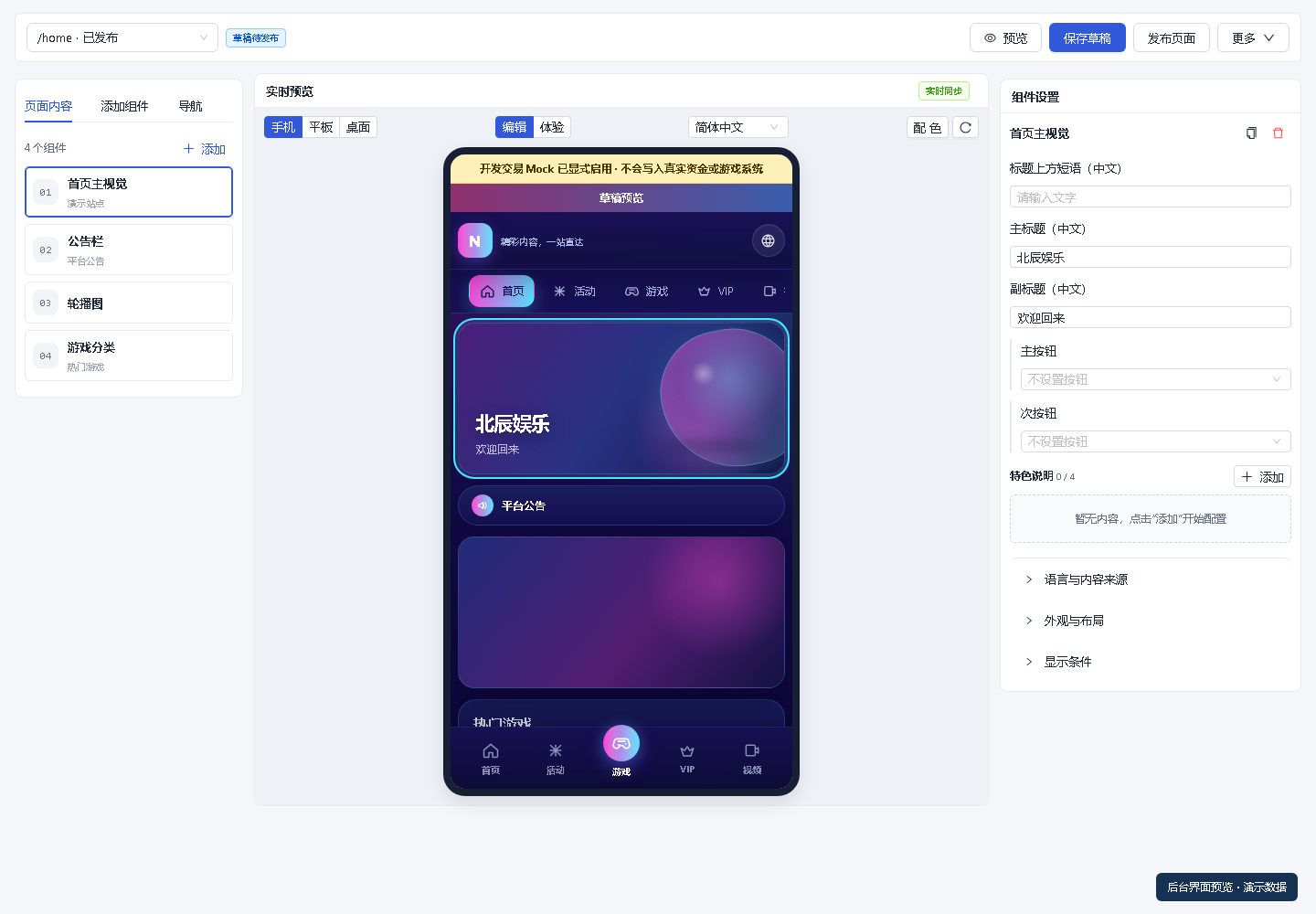
Choose a template and arrange components, then add your name, logo, announcements and campaign entry points.
- Template selection and page previews
- Brand content and components
- Mobile and desktop experiences
Wuhen WH · Websites and operations
Configure player pages and brand content, then manage members, orders, campaigns and support from one workspace. Confirm game, payment and deployment requirements for your project.
 Brand artwork
Actual interfaces with demonstration content.
Inside the product
Explore screenshots from actual templates and admin interfaces. All screenshots use demonstration content and can be enlarged.
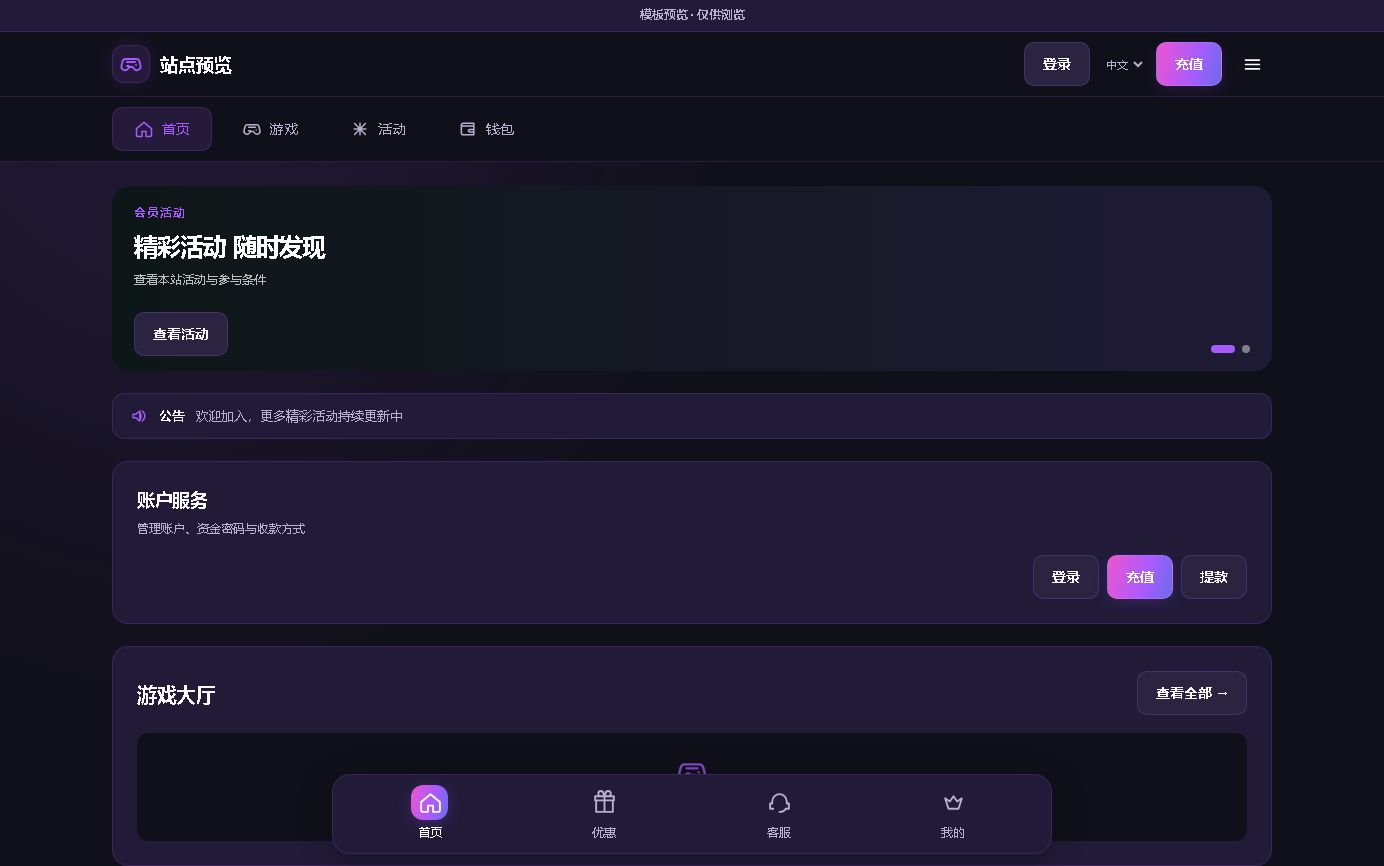
A dark desktop layout with category navigation and account access.
A dark and gold layout with everyday service access on mobile.
A mobile-focused vertical layout with campaigns and common actions near the top.
Actual template preview captures with neutral branding and empty business lists. Images illustrate the layout; confirm features and current interfaces in a demo.
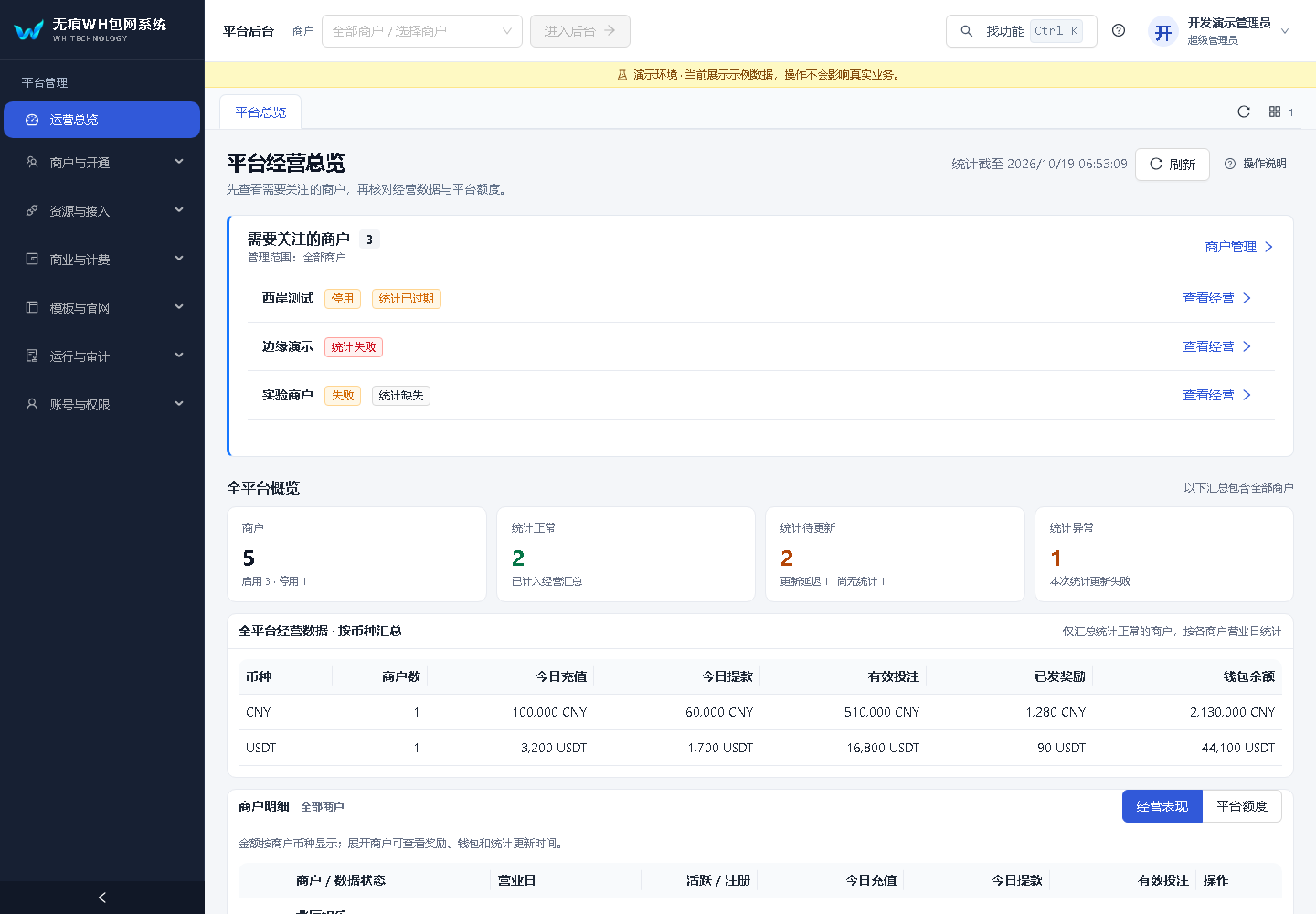
Review business summaries and items needing attention.
Find members and continue the service conversation.
Choose components, edit content and preview pages.
Actual interface · Demo data
Admin screenshots use demonstration data to explain workflows. Values, accounts and statuses do not represent live business.
Your daily workflow
Configure the site, organize member service and prepare integrations. Each team works within its own workspace.
Choose a template and arrange components, then add your name, logo, announcements and campaign entry points.
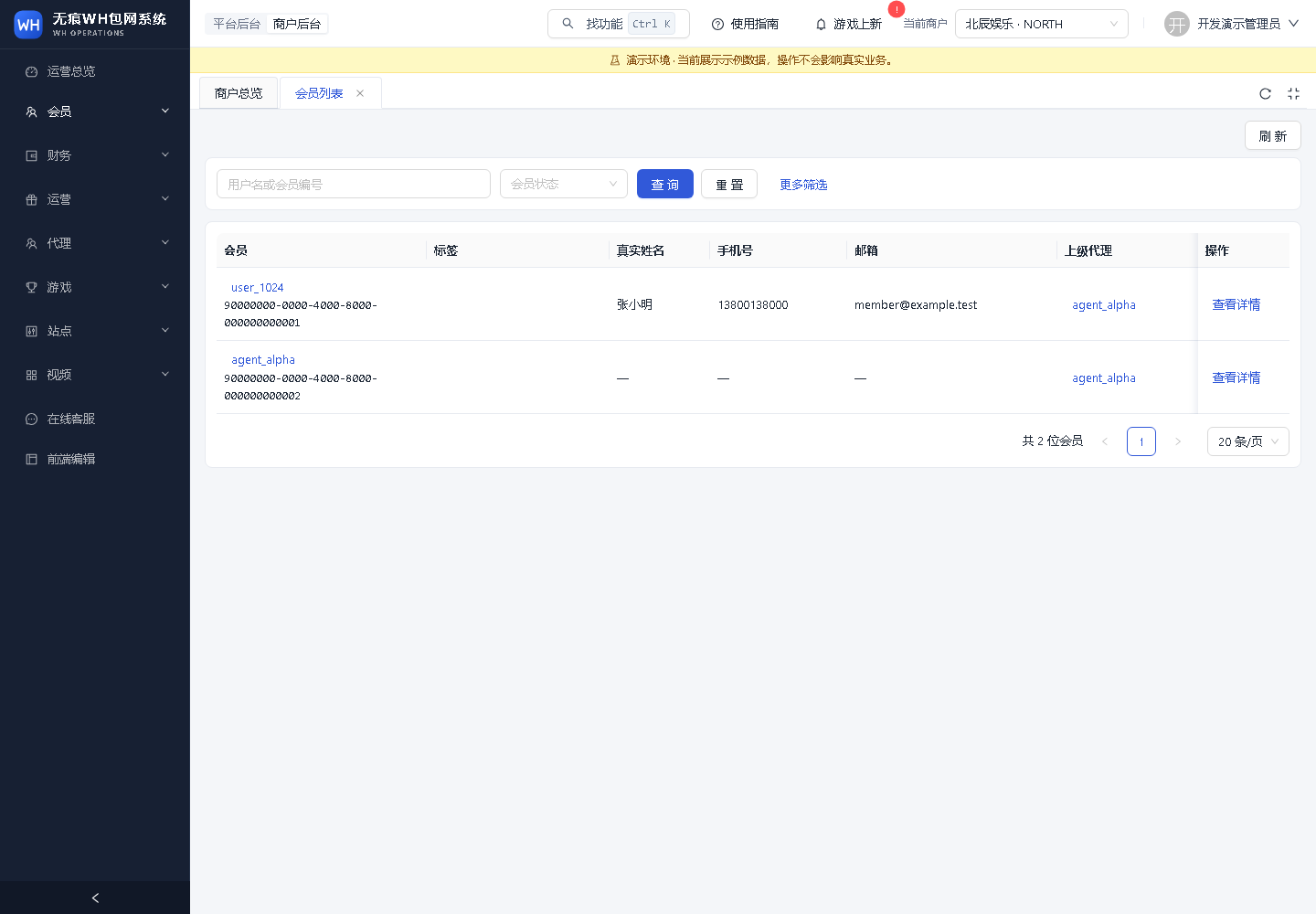
Start with members, orders and campaigns. Assign roles and connect queries, processing and support collaboration.
Confirm content, payments, domains and deployment needs for your market, then review activation and delivery scope.
Capabilities and scope
Page configuration, members, orders and role permissions form the everyday workspace. Confirm the configuration and scope of commerce, AI and automation for each project.
Coordinate branded websites, provider integrations, member services and operations from a unified workspace.
Combine layouts, themes and campaign entry points to reflect your brand's identity.
Plan language, currency, time zone and content around the needs of each target market.
Bring member segments, notification tasks and support assistance together to free up time for meaningful conversations.
Role-based permissions, audit records and data separation support accountable teamwork.
Start with standard capabilities and plan custom features, integrations and deployment as your business develops.
Explore configurable and custom options
 REWARDS, REIMAGINED.
EXCLUSIVE EXPERIENCE / MEMBER REWARDS
Plan products, redemption rules and order fulfillment to extend how members use their benefits.
Build a rewards marketplace around your members: from product categories and redemption rules to membership growth and order fulfillment. Give campaign rewards more ways to be used, and create lasting connections between your brand and its users.
Discuss your marketplaceConnect points and campaign benefits with redemption experiences that make the value of membership easier to understand.
Plan categories such as technology, everyday essentials and branded merchandise around your audience.
Link redemption benefits to membership levels, tasks and campaigns, with clear feedback for participation.
Plan traceable workflows for stock, eligibility, redemption orders, review and delivery status.
Build recognition through exclusive merchandise and thoughtfully designed benefits that can evolve over time.
LIFECYCLE AUTOMATION / MEMBER OPERATIONS
Connect member segments, messaging and service records, so your team can continue every conversation with context.
Plan message content and timing around member tags, campaign participation and service needs. Notification batches, delivery records and team conversations reduce repetitive work and keep communication clear and relevant. Additional trigger strategies can be tailored to the project.
Member tags · Service context
Message content · Delivery schedule
Team collaboration · Human follow-up
Delivery records · Operational data
AI CONCIERGE / INTELLIGENT SUPPORT
The WH AI concierge helps your team find information, explain campaigns and coordinate customer support.
Bring knowledge, messages and business queries into one service workflow. Help your team understand requests, prepare responses and continue conversations. AI uses authorized data and knowledge; financial and other critical operations remain subject to the platform's permissions and review processes.
Explore AI support
Find profiles, tags and service records in one place to support informed conversations.
Locate game accounts linked to member profiles and reduce repeated searching.
Use verified receiving-account settings to provide accurate and consistent instructions.
Bring order details and receipt clues together to help your team investigate and follow up.
Organize reporting queries to help your team understand operational changes.
Explain eligibility and redemption steps using the campaign rules configured on the platform.
Guide users through available content based on their requests and the authorized catalog.
Organize requests through queues and tasks, with capacity planned for each deployment.
Explain account, deposit and website features in clear, practical steps.
Help make common support conversations clear and friendly, with human handover for complex cases.
Identify and categorize topics so each question reaches the appropriate workflow.
Delivery process
Prepare the content, configuration and integrations for the agreed scope. Review the site and daily workflows together before launch.
Define your target markets, brand positioning, product mix and delivery scope.
Prepare brand visuals, site content, operating rules and team permissions.
Connect domains, content and external services, then verify real business workflows.
Confirm the launch checklist, hand over operating guidance and plan ongoing improvements.
GLOBAL REACH. LOCAL TOUCH.
Plan for each market, from language and payments to content preferences and service.
Plan language, currency, time zones, content preferences and payment integrations for markets including Vietnam, Thailand, the Philippines, Malaysia, Indonesia, Cambodia and Myanmar.
Assess multilingual content, mobile access and local service integrations for target markets such as India, Bangladesh and Pakistan.
Plan content and technical delivery around your brand for markets such as Brazil, Taiwan, Singapore and Australia. Service availability is confirmed for each project.
Markets shown are for solution planning. Language support, payments, content rights and local operating requirements must be confirmed before delivery.
Ways to work together
From standard platforms to tailored solutions, define delivery around your market and business needs.
Standard setup
For teams starting with a standard platform.
Brand adaptation
For teams requiring broader delivery and operational planning.
Tailored
For brands with defined visual and functional requirements.
| Delivery scope | Standard setup | Brand adaptation | Tailored |
|---|---|---|---|
| Client experience | H5 / Web | H5 / Web + app planning | Project-specific |
| Brand design | Standard theme configuration | Brand adaptation | Dedicated UI / UX |
| Games & payments | Selected integrations | Integration planning | Custom API extensions |
| Member operations | Core campaigns and messaging | Segments and operational configuration | Tailored automation workflows |
| Deployment | Standard deployment planning | Optional dedicated deployment | Project-specific architecture |
| Rewards marketplace | Optional project | Optional project | Custom feature planning |
| SEO & content | Core website settings | Content and structure optimization | Brand content project |
Features, external resource rights, delivery timelines and fees are subject to the agreed project scope.
Common questions
Understand templates, integrations, account handover and maintenance scope.
It is for merchant teams building branded sites and managing daily operations. Player pages provide access to site features; merchant workspaces handle members, orders, campaigns and support. The platform workspace manages merchant setup, resources and access. Scope is agreed per project.
Solutions can be planned around sports, esports, live content, slots, poker and CP. Websites support desktop and mobile H5 experiences; app and PWA distribution can be planned as needed. Actual content depends on licensing and provider activation.
Yes. Configure your brand name, logo, domain, theme and content. Standard solutions support visual configuration, while tailored projects can extend the design and functionality.
Agree on account ownership, role permissions, data handover and maintenance responsibilities at the start. Review site configuration and operating instructions at handover. Backup, deployment and future changes follow the agreed service scope.
The marketplace is a tailored project covering products, benefit rules and fulfillment. AI support is configured around knowledge, conversations and authorized queries. Additional automation and custom capabilities are scoped separately; critical operations retain permission and review controls.
Use the business contact details below to share your target market, required features and deployment preferences. The team can then outline scope, delivery stages and fees, and arrange a suitable demonstration.
KNOWLEDGE / INSIGHTS
Understand the key decisions behind platform selection, localization and operations.
Start with the market and product. Then match the technology.
All-in-one solutions suit a broad content portfolio. Sports, esports and poker platforms suit brands with a defined focus. Consider user access, content rights, payments, administration permissions and maintenance responsibilities together, then choose a standard or tailored approach.
Align language, payments and service.
Prepare brand content, currency and time-zone settings, available payment services, content rights, domains and service arrangements for your target market. Mobile usability, local language and support workflows also matter. Verify the actual operating journey before launch.
Start with clear rules and reliable data.
Organize member tags, message templates and common questions first. Define outreach conditions, frequency, human handover and delivery records. Use automation for repeatable, verifiable tasks while keeping people responsible for important business decisions and communication.
Tell us your target market, team responsibilities and required features. Use a contact channel below to discuss the demo, delivery scope and fees.
Helpful to prepare: target market, required pages and features, existing resources and desired launch schedule.
Already a partner? Open your workspaceLoading contact details…